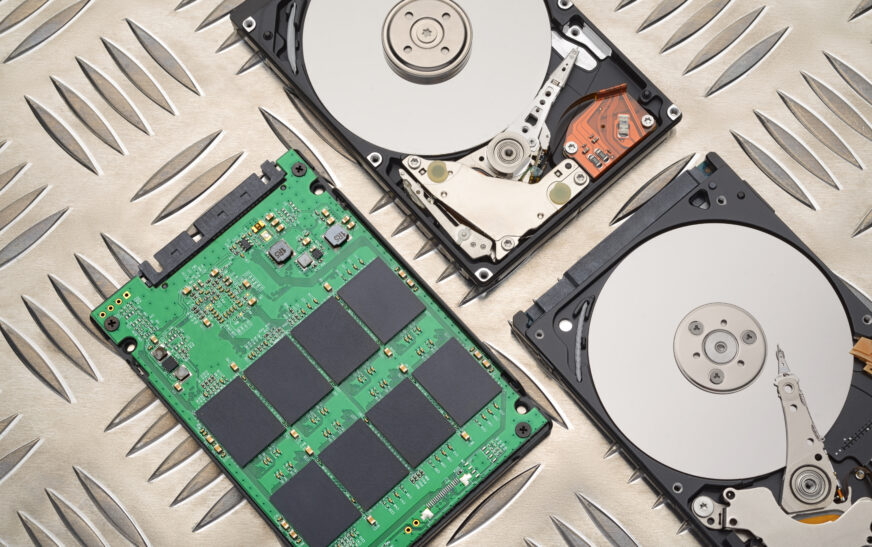
Choosing the appropriate storage for your computer, smartphone, or other devices requires a comprehensive selection process because of numerous options available. Currently, two storage types dominate the market: solid-state drives (SSDs) and hard disk drives (HDDs). Both types have advantages and disadvantages. Understanding the key features can help determine whether you need to choose an SSD or HDD as storage. Speed is among the crucial criteria to consider when selecting the right storage type.
Considering the Speed Factor
One of the main advantages of SSD storage is its exceptional speed. Read/write speeds of SSDs are significantly higher than those of HDD storage. According to various tests, SSDs’ maximum read/write speeds are 5 GB/s, while the fastest HDDs reach only 200 MB/s. It means that SSDs are significantly faster and allow loading applications, transferring files, and booting devices within seconds. If you want to start gaming immediately after turning on your computer, then an SSD is a better choice than HDD.
Despite the outstanding performance characteristics, SSDs are slightly more expensive than HDDs per gigabyte. Therefore, if you plan to purchase storage with large capacity for storing big files, you should prefer HDD because of the lower price. On the other hand, if you are ready to pay more for the high speed, then SSD will be a great choice.
Examining Capacity and Cost
Storage capacity is another important factor to consider when choosing the appropriate drive. Currently, HDDs are available in different volumes starting from 500 GB and reaching 12 TB or more. However, you can find SSDs with the same volume but at a higher cost than HDDs. In other words, SSDs are more expensive per gigabyte than HDDs, which can be considered a disadvantage for users who need a storage device with high capacity.
Nevertheless, it should be noted that the cost of SSDs has decreased in recent years. Therefore, SSDs became more available to users with a limited budget. Currently, manufacturers produce inexpensive SSDs that offer good speed and storage capacity. For instance, a 1 TB SSD may cost about $300, while a 2 TB HDD may be sold for $100. Thus, if you need a storage solution with a sufficient volume and decent speed, you should prefer SSD.
Understanding Power Consumption and Durability
Power consumption is an important aspect to keep in mind when choosing between SSD and HDD storage. Usually, SSD consumes less power than HDD and, therefore, it is better for laptops, smartphones, and other mobile devices. Moreover, HDD storage generates more noise because of rotating platters, which can affect sound quality. At the same time, HDD storage produces much heat when working. Thus, users with laptops should give preference to SSD because of its low energy consumption.
Additionally, SSD storage is more durable than HDD. In other words, it can withstand mechanical shocks and drops better than HDD storage. As a result, HDD may fail in case of physical impacts, while SSD will work correctly. Thus, if you need reliable storage that will not fail under any circumstances, then you should prefer SSD storage.
Assessing Security and Data Protection
Both HDD and SSD provide reliable mechanisms for data encryption and password protection, which increases safety levels. However, some users prefer to use hardware-based encryption (HBE) to protect their data. It refers to a special type of encryption that works at the hardware level. Such data protection increases security because it provides additional protection against hacking attempts.
Currently, many storage manufacturers produce self-encrypting drives (SEDs) that encrypt users’ data at the hardware level. SEDs guarantee better protection than standard SSD and HDD drives. In addition, HBE helps reduce the risk of accidental data leakage. Therefore, if you need extra security for your data, then you should purchase a storage device with hardware-based encryption.
Evaluating Compatibility and Upgrade Options
If you have an older computer, you should think about the compatibility of storage with your computer. SSD storage devices have the same interface as HDDs, so you can replace existing storage with a new SSD easily. On the contrary, HDD storage can be installed only by professionals because of the complicated process. Therefore, if you need a storage device with a plug-and-play system, you should purchase an SSD.
In addition, SSDs offer more diverse compatibility options such as SATA, PCIe, NVMe, and M.2. Therefore, users who need fast transfers and high speed can buy M.2 SSDs because they offer high speed. On the other hand, NVMe SSDs can also provide high-speed connections.
Making the Right Choice for You
To conclude, users should choose storage devices based on their individual needs. If you need fast performance, you should buy an SSD storage device. On the other hand, HDD storage will be more appropriate if you need large capacity for storing large files. Users should also pay attention to such criteria as energy consumption, speed, durability, security, and compatibility.